Five questions decide a property. One engine answers all of them.
What can you build? What could stop you? What are you actually buying? What's it worth? What's happening around it? Enter a Greater Sydney address and one engine answers the questions the deal turns on — every figure traced to the clause it came from — before you buy, build, or advise.
No signup required. Statewide planning checks for any NSW address.
What can you build here?
- Zoning + the full LEP land-use table — permitted & prohibited uses
- Height of buildings · FSR · minimum lot size
- Low & Mid-Rise ceiling lifts (upzoning check)
- Every applicable SEPP identified — Housing · Transport & Infrastructure · Sustainable Buildings · Resilience & Hazards
- Housing SEPP eligibility per form, clause-cited — granny flat · dual occ · manor house · terraces · low-rise apartments
- SEPP ↔ LEP overrides applied
- TOD precinct — accelerated / deferred — + station proximity
- DCP setbacks front / side / rear · site coverage · landscaping & deep soil · parking rates
- ADG requirements — solar access & building separation
- CDC / exempt-development screening
- Subdivision feasibility
- Additional permitted uses · key-sites clauses · active street frontages
- BASIX climate zone & water standard
What could stop you?
Every overlay that bites — mapped, and read from satellite, not assumed from a form
- Flood — EPI flood planning area + satellite flood history + river gauges
- Bushfire-prone land & category · fire history · live hotspots
- Heritage items & conservation areas — portal + council mapping
- Contaminated land (EPA) · acid sulfate class · landslide
- Biodiversity values · riparian & waterways · wetlands
- Coastal — land application · environment & use areas · littoral rainforest · inundation
- Foreshore building line · classified road
- ANEF aircraft-noise contour & level
- Mine subsidence district · drinking-water catchment
- Road corridors · land reservation & compulsory acquisition · portal warnings
- Overshadowing — yours and your neighbours' — against solar-access controls
- Terrain & slope · urban heat · design rainfall intensity
- NARCliM climate projections
What are you actually buying?
The lot as it legally stands — including works that were never approved
- Title — strata or Torrens, plan number, units in plan
- Lot dimensions · frontage · depth · battleaxe geometry
- Structures on the ground vs the DA/CDC record — unapproved-works screening
- Pre-DA site history from imagery
- Contributions payable — s7.11 / s7.12 + Housing & Productivity
- Land tax exposure at current thresholds
What's it worth?
- VG land value + 5-year history
- Comparable lots & percentile rank in the suburb
- Value per m²
- Development headroom — envelope vs what stands today
- Rooftop solar yield potential
What's happening around it?
The street's direction of travel — before it shows up next door
- Nearby DAs — applications, outcomes & descriptions
- Council approval & refusal statistics by development type
- Neighbour-development shadow threat
- Satellite change detection on surrounding lots
- Watch the address — alerts when anything changes
Depth 1 · the whole site
Site Report
early access — formerly the Intelligence Brief
All five questions answered in one document — what you can build first, the evidence underneath.
for developers · buyers agents
Depth 2 · one topic
Topic Reports
conveyancer + 6 topic reports
One question on its own — Flood, Bushfire, Disclosure — a single slice of the Site Report.
for conveyancers · homeowners
Depth 3 · the source rules
Site Controls
for professionals — formerly Verify
Every provision that applies, quoted to the clause and page — the raw source the reports are read from.
for planners · architects
The answer first: what you can build, and what's stopping you.
The Site Report opens with the building envelope computed from the published planning controls for the site — and the constraint that binds it. The dossier underneath is the evidence: the rules cited to the clause, and the property itself read from above.
The rulebook
Zoning, standards, SEPPs and council controls — structured and cited to the source clause. Not a summary, not a guess.
The real world
The same flood, bushfire, shadow and terrain reading as the individual reports, in one brief — read from satellite and terrain, not assumed from a form.
Tell us your plan — the report reorders around it.
When we can't compute it, we tell you why — we never fill the gap with a guess.
The same intelligence, packaged for the job
When you need one answer for one decision, take it as a report — built for a specific question and audience, each on the same cited planning data and satellite reading behind the Site Report.
Conveyancer report
One more search on the matter. Covers the planning picture the 10.7 certificate doesn't, as a client-paid disbursement — every item sourced, so the file shows the check was made.
Open reportFlood risk
Flood exposure for the site, from satellite and terrain — not just the council flag.
This flood reading is one section of the full Site Report for this address.
Open reportBushfire risk
Bushfire-prone status and category, with the planning consequences that follow.
This bushfire reading is one section of the full Site Report for this address.
Open reportSolar potential
Roof solar potential estimated from imagery, for the actual building.
This solar reading is one section of the full Site Report for this address.
Open reportGranny flat potential
Whether a secondary dwelling fits the lot and the controls, before you design.
This check is one section of the full Site Report for this address.
Open reportOvershadowing
How a proposal — or a neighbour's — casts shadow, against the solar-access controls.
This shadow reading is one section of the full Site Report for this address.
Open reportDevelopment monitoring
Watch this address — new development applications nearby, and alerts when things change around the property.
Open reportSite Controls: the rules, cited to the source
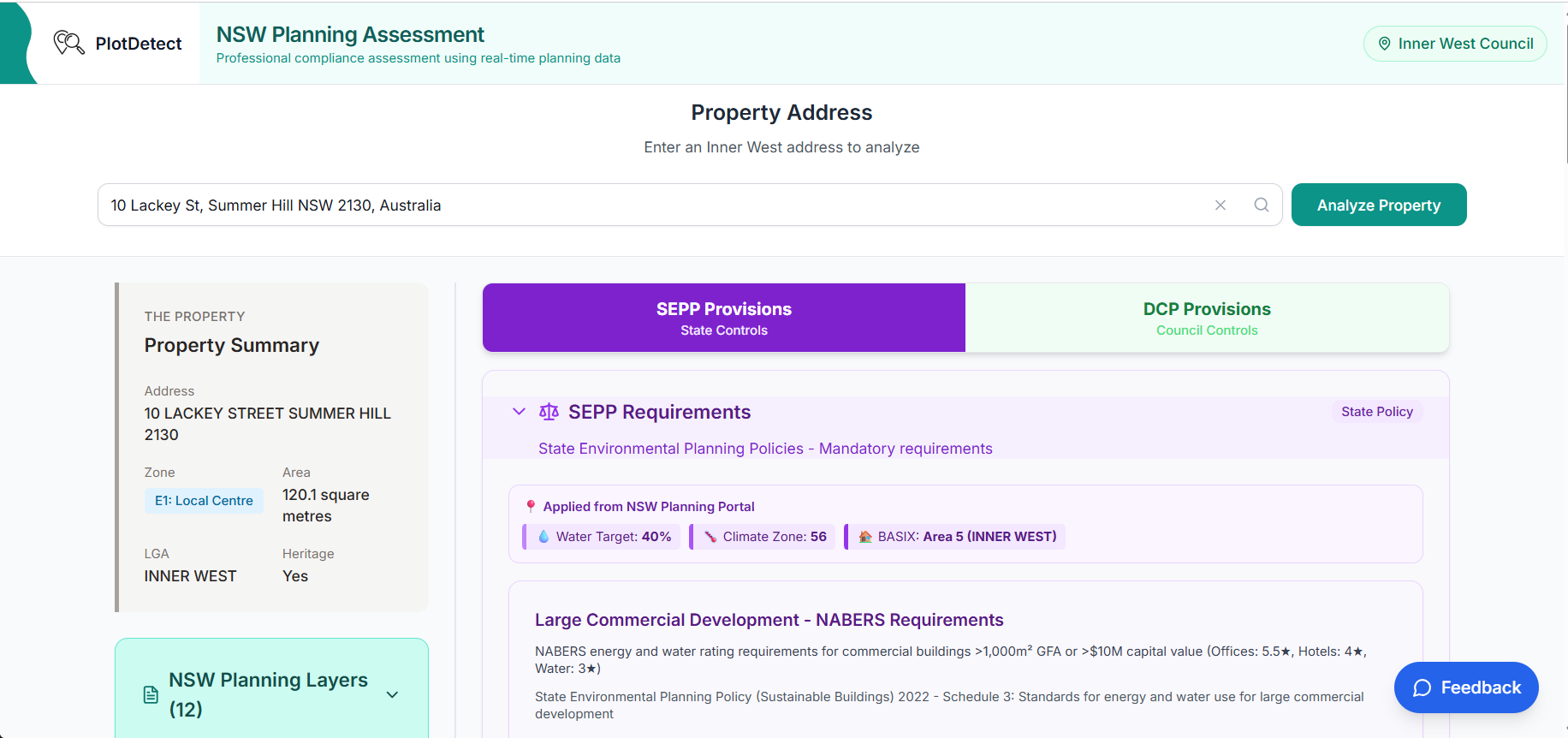
The Site Report synthesises; Site Controls is where professionals go deep on the rules behind it — the structured planning corpus that powers everything PlotDetect returns.
Design against the actual controls, from the start
See every provision that applies to your site before you draw a line. Build your DA checklist in minutes, not after rejection.
Planning assessments mean cross-referencing LEP clauses, heritage maps, DCP provisions and SEPP requirements. Site Controls consolidates them into one address-filtered view. Enter an address, get the provisions for your zone, precinct and site conditions — including ADG, TOD and Housing SEPP eligibility. Numeric controls — setbacks, parking, landscaping — are cited to the exact clause and page, so you can check each one against the source. It surfaces precinct-specific controls you'd miss reading the generic DCP.
"I found a provision but can't cite the page number"
→ Numeric controls link to the source clause and page. One click to check.
"I have to read the whole DCP to find what applies to me"
→ Enter address, get provisions for your zone, precinct, and conditions
"Does my property qualify for the housing reforms?"
→ Eligibility checker for manor houses, dual occ, low-rise apartments
And two free explorers
Where PlotDetect started — still free, still useful for orientation before you run the Site Report.
Scout
Free · NSW-wideClick any property in NSW on a map — zone, FSR, height, hazards, land value, DA pins. Explore corridors and compare sites without typing an address.
Open the mapValidate
Free · 98 councilsDA analytics the Planning Portal doesn't give you — approval rates by council, development-type breakdowns, weekly trends.
Open the chartsWhere we're deep — and why
Every NSW address gets the state and council-wide layer. The detailed council controls are hand-verified, not scraped — so we build them deepest-first, across metropolitan Sydney, where the transactions, the value and the planning complexity concentrate.
Any NSW address: zoning, height, floor-space ratio, minimum lot size, SEPP and hazard checks — pulled live from the NSW Planning Portal, so they're always current.
Established Sydney — inner, eastern & north
The high-value, high-transaction market — heritage, renovations, dual-occ and apartments, where planning complexity bites and the professionals cluster.
Growth corridors — west & south-west
The high-volume development market — new housing, subdivision, granny flats and infill, where most of Sydney's building activity happens.
Depth varies by council. The numeric controls — setbacks, parking, landscaping — are structured across the councils listed above. The full provision-by-provision browser is deepest in the Inner West, with partial provision text in several other councils so far. Every product shows the depth available for the address you enter, so you see exactly what is and isn't covered before you rely on it.
We prioritise a council when its transaction density, property value and planning complexity justify the verification work. The Lower North Shore is next. Request your council.
One engine. Your door.
Every product runs on the same cited planning data and satellite reading — packaged differently for each job. Find yours.
Developers
Site acquisition due diligence in minutes, not days — controls, hazards, nearby approvals and computed capacity in one brief.
Buyers agents & investors
Know what you're buying before exchange. Answer a client's "what could this property become?" before the inspection, with every claim traceable to its source.
Architects & building designers
Find the setback, solar access and landscaping provisions for a site without reading 500 pages — cited to the clause.
Planners
Every provision for the site in one address-filtered view. Cite page numbers in SEEs; check approval patterns before advising.
Conveyancers
One more search on the matter — covers the planning picture the 10.7 certificate doesn't, as a client-paid disbursement. Every item sourced, so the file shows the check was made.
Builders & certifiers
Check the controls and constraints on a job site before quoting or certifying — including bushfire and flood status.
Real estate agents
Answer "can they build a granny flat?" with something better than a guess — a cited brief on the listing.
Homeowners
Thinking about a granny flat, extension or solar? Plain-English checks on your own address.
Inside PlotDetect
How we built it. Where we're taking it.
How Verify Was Built
Engineering trust into planning compliance. Every claim traceable to its regulatory source. Zero false negatives.
Read the technical story →Introducing the Intelligence Brief
One address, one answer — why PlotDetect now leads with the Brief, and how the tools and reports fit behind it.
Read the full story →AI-calculated compliance metrics
Auto-calculate lot coverage, deep soil %, and vegetation from satellite imagery. Verify DCP compliance before survey.
Deepening across metro Sydney
Going deeper into each council's controls, council by council. The Lower North Shore is next.
Approval predictions
ML-powered likelihood scores based on historical approval patterns.
Platform-wide
Change alerts • Saved searches • Team sharing • Pre-DA checklists